 Cotiza
Ready in 2 minutes
Your details, logo and payment methods are saved. You only fill in the client and what you sell.
Create quotes, simple invoices and receipts as PDF with your logo, let taxes and discounts calculate themselves, and send them on WhatsApp. No Word, no Excel, no sign-up.
Free: 3 PDFs per month. Your data stays on your device.
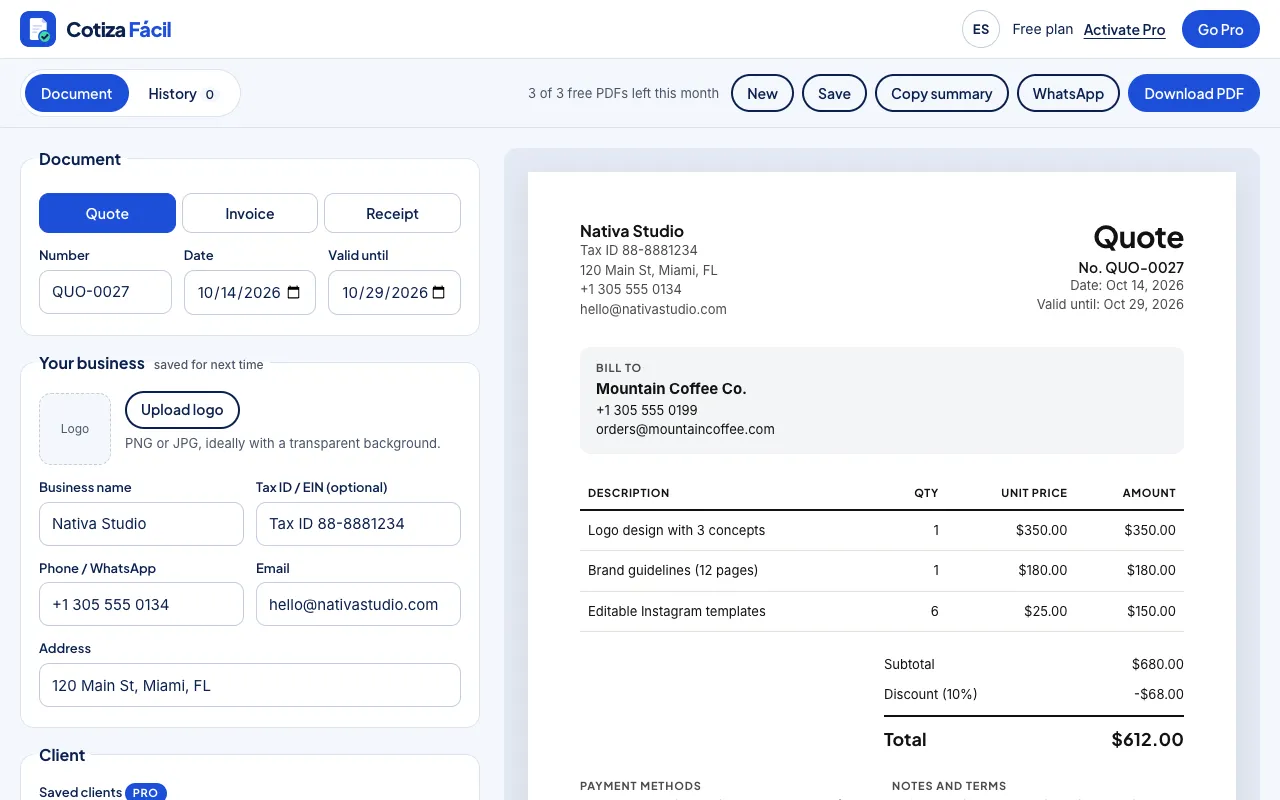
A quote (or estimate) tells the client what you will deliver, how much it costs and how long that price is valid. It should include your business details and logo, the client’s details, a number and date, each product or service with quantity and unit price, the subtotal, discount, sales tax or VAT, the total, a valid-until date and your payment methods. With Cotiza Fácil you make it in 2 minutes and download it as a PDF.
A clear, branded quote builds trust and gets faster replies.
Your details, logo and payment methods are saved. You only fill in the client and what you sell.
Subtotal, discount, tax and total instantly, rounded to the cent. Zero calculator mistakes.
Quote, invoice and issue the receipt when you get paid, with automatic numbering and references.
Send the client a summary with items, total and your payment methods.
History marks each document as sent, accepted, unpaid or paid, and flags overdue invoices.
Everything stays in your browser. Download a backup to move your data to another phone.
Name, logo, tax ID, phone and payment methods such as Zelle or bank transfer. They are saved for your next documents.
Name or company, phone with country code for WhatsApp, and email. With Pro you pick saved clients in one tap.
Write each line with quantity and unit price. Subtotal, discount, tax and total calculate themselves.
Valid-until date, deposit, delivery time and, if you want, signature lines for you and the client.
Tap “Download PDF”, then “WhatsApp” to send the summary to the client’s chat. It stays in your history with its status.
No contracts: cancel anytime from Hotmart.
Billed monthly. Cancel anytime.
Secure checkout with Hotmart: card, PayPal and local methods. Activate Pro inside the app with your purchase email, instantly.
We build your website with a quote form, catalog and WhatsApp button so customers can ask for prices without waiting.
Your business details and logo, the client’s details, a number and date, each product or service with quantity and unit price, subtotal, discount, tax, total, a valid-until date and payment terms. Cotiza Fácil puts all of that in the PDF.
No. Cotiza Fácil creates quotes, receipts and simple (non-tax) invoices so you can bill professionally. If your country requires electronic invoicing, issue it in the authorized system; you can still use Cotiza Fácil for quotes and receipts.
Enter the percentage for your location. It is applied to the subtotal minus the discount, and the total updates instantly.
No. Open the app and start. Your data is saved in your browser; if you switch phones or computers, download a backup from History and restore it on the other device.
Tap “Download PDF” and choose “Save as PDF” (Android) or share and print to PDF (iPhone). Then send it on WhatsApp.
Yes. On the free plan, duplicate the quote and change the type. With Pro, from History you turn a quote into an invoice in one click (with a new number and reference) and a paid invoice into a receipt.
Subscribe on Hotmart, then tap “Activate Pro” in the app and enter the same email you paid with. It activates instantly on that device.
Yes. The subscription is monthly and you cancel from your Hotmart account. You keep Pro until the end of the paid period and your documents stay saved.
A step-by-step guide and other free Armony apps for your business.